How to Make a Lithophane From a Photo
Which photos work, how thick to make it, how to print it, and when to choose a flat panel, a curve or a lamp. A practical guide for 3D printers.
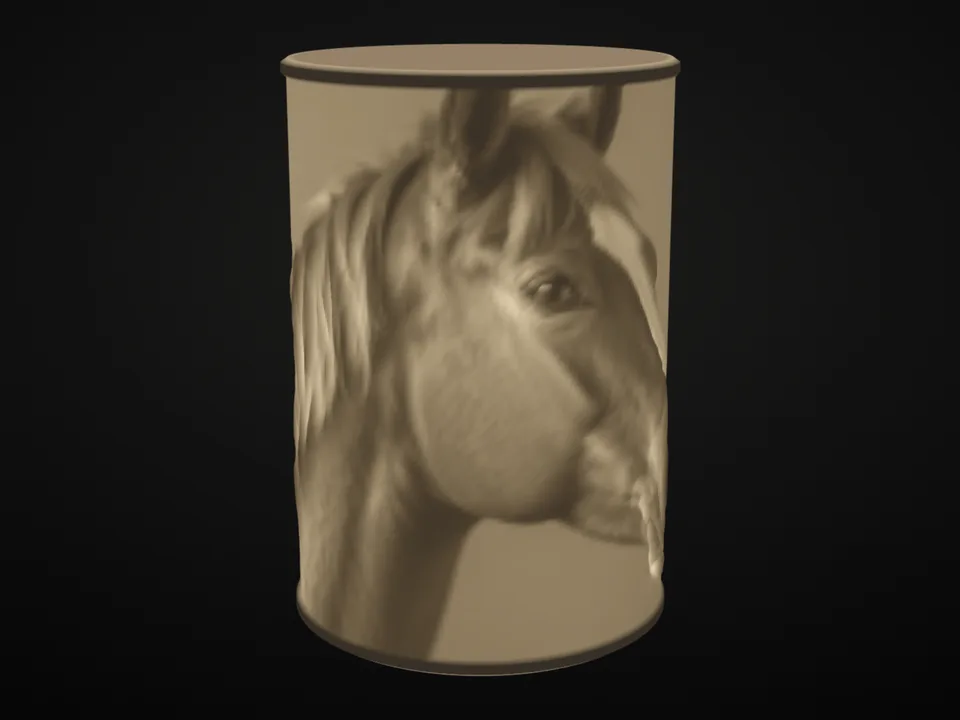
A lithophane is a thin panel whose thickness follows a photo: thin where the photo is bright, thick where it is dark. Unlit it looks like a pale, bumpy plate. Put a light behind it and the photo appears, because thin plastic lets more light through than thick plastic.
That also means a lithophane needs no depth map. It is made from the photo's brightness alone, which is why it is instant in the Lithophane maker and costs nothing.
Pick a photo that will glow
- Clear light and dark areas. A face lit from one side, a pet against a plain wall, a landscape with sky and shadow. Flat, hazy photos come out as an even gray glow.
- A subject that fills the frame. Small details, such as faces in a group photo taken from across a room, are lost at the size of a print.
- Not too dark. A dark photo becomes a thick panel that lets little light through. Raise Brightness in the Tone group, and Contrast if the photo is hazy; the Backlit view shows the result as it will look lit.
Set minimum and maximum lithophane thickness
The two numbers that matter are the thinnest and the thickest point.
- Thinnest, about 0.8 mm. This is where the photo is brightest. Thinner than that and a 0.4 mm nozzle struggles to print it solid, and the brightest areas can break through.
- Thickest, about 3 mm. This is where the photo is darkest. Going thicker gives deeper blacks but needs a brighter light.
A solid border at full thickness, about 4 mm wide, keeps a flat panel straight and gives it an edge to hold.
3D printing settings for lithophanes
- White or natural PLA. Colors and dark filaments block too much light. PETG works too, though it is more translucent, so the photo looks softer.
- 100% infill. Any infill pattern shows through as a grid when lit.
- Upright. Printing the panel standing on its edge puts the fine detail in the layer lines, where a printer is most precise. A brim helps a tall panel stay on the bed.
- Fine layers. 0.12 mm layers show more steps of gray than 0.2 mm, at the cost of time.
Flat, curved, heart or lamp
- Flat suits a light box, a frame or a window sill. Standard sizes are 4 × 6 and 5 × 7 inches. Depth Map Generator sizes a printed box to the panel, which slides in from the top. See how to assemble and light a lithophane light box.
- Curved (90°, 120° or 180°) stands up on its own and spreads the light of a single tea light across the whole photo.
- Heart is a common gift shape for anniversaries and memorials.
- Lamp: the photo rolled into a closed cylinder that sits over a light. The lithophane lamp maker makes them 80, 100 or 120 mm across the inside, so they fit over an LED tea light or puck, and exports them standing up, ready to slice.
Use an LED light, not a candle. PLA softens at around 60 °C, and a flame in a closed cylinder gets hotter than that.
See it before you print
Depth Map Generator shows lithophanes lit from inside in its 3D view, using the thickness you set, so you can judge the contrast before spending hours on a print. The Backlit view shows a flat panel the same way.